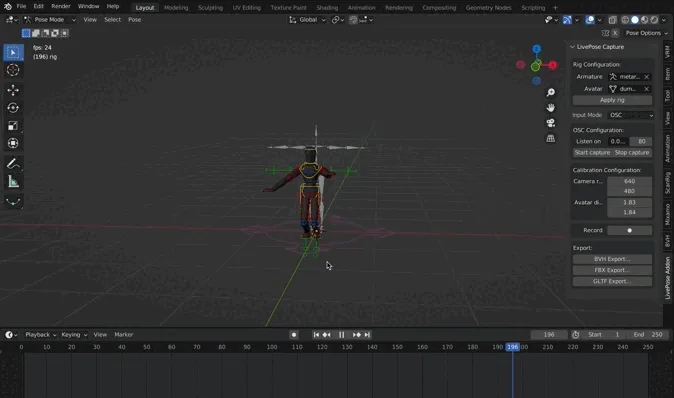
Motion capture demo in real time with LivePose Capture.
In this blogpost, I will present how I developed an add-on enabling motion capture in Blender through the LivePose software, during my internship at Metalab. First, I will discuss the partnership with the Orchestre symphonique de Montréal (OSM) as part of the SAV+R (Simulation d’acoustique volumétrique en réalité virtuelle (RV), mixte (RM) ou augmentée (RA) )research project. Then, I will talk about the tools we used before presenting how the extension works and concluding on what was made possible by the work accomplished.
Motion capture is the name given to the set of techniques allowing us to record positions and rotations of living beings. A visual rendering of these movements can be obtained in real time through the use of a diversity of tools, including 3D engines.
Tools for creativity are becoming more accessible than ever, including tools for motion capture who are becoming more and more popular in digital arts. Motion capture is used in live performances as well as interactive installations 1.
Free and libre tools like LivePose allow the user to use pose detection and action follow-up in real time. A tool such as the Blender extension for LivePose enables beginners and professionals alike to work with motion capture in their artistic practice.
The topic of motion capture was previously explored in an internship on human face rendering in Blender.
The SAV+R project
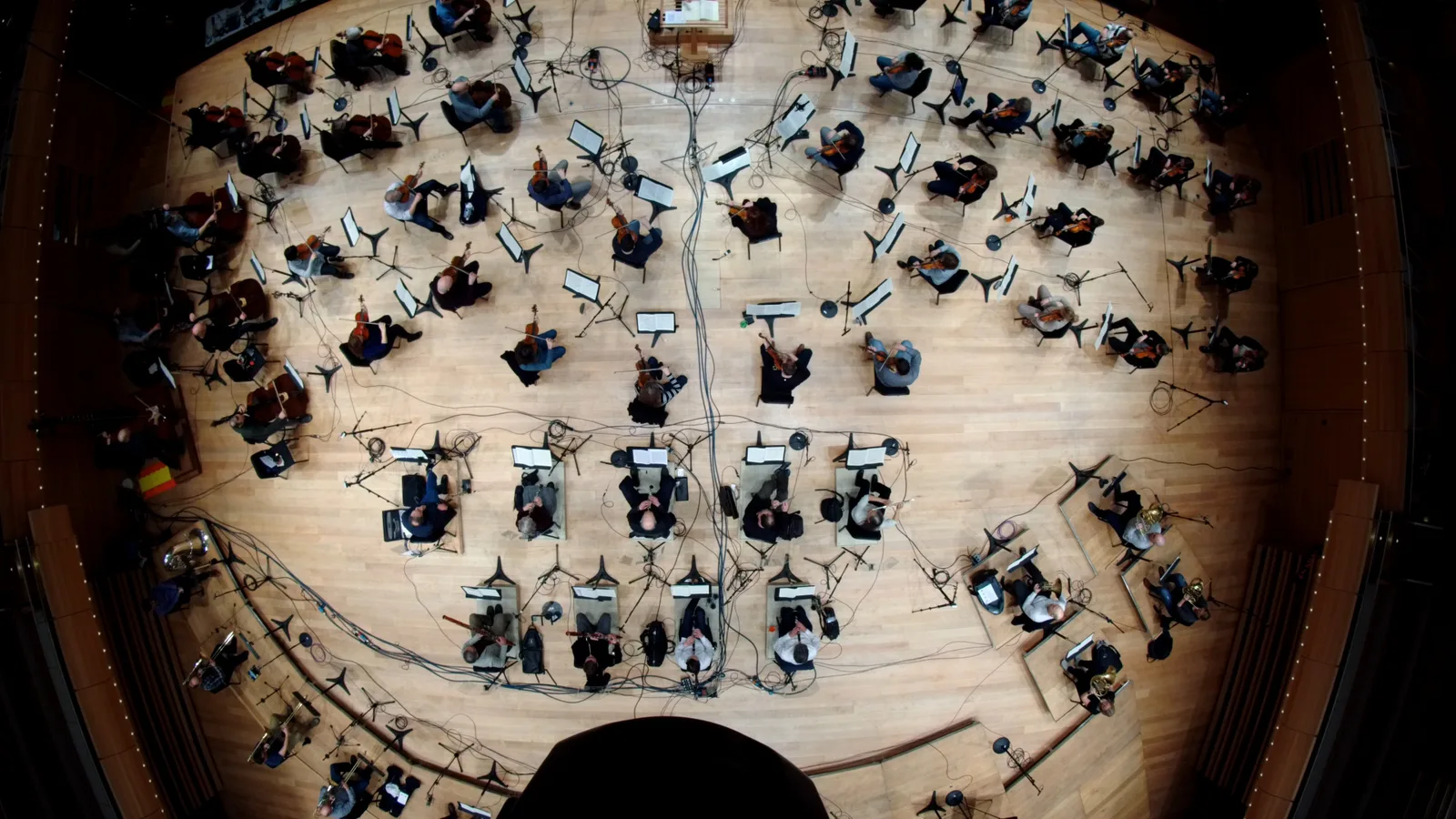
Picture of the OSM as seen from above, displaying the range of cameras used for the project, among the interpreters.
The main goal of this internship was to address the needs of the partnership between the OSM and the Metalab as established by the research program SAV+R (Simulation d’acoustique volumétrique en réalité virtuelle (RV) ou réalité mixte (RM)). This partnership is about bringing classical music to life in a sound navigation immersive experience in augmented reality.
With this goal in mind, Musique6D Inc. is developing the mobile application OSM Polyphonique in partnership with the OSM. This app allows the user to explore an interactive experience of spatialized sound in augmented reality, creating an immersive sound exploration in which the user can move through the orchestra.
While developing the app, visuals considerations added themselves alongside spatial audio matters in order to create an immersive environment. The current goal is now to improve musical instruments representations, already evocatives, by adding animations that would make the 3D scene come alive, following the rhythm of musical works. Modeling the musicians and the conductor will allow us to render the true movements and gestures associated with the music performances played by the app.
Recording at the OSM
Following two audio captures of the OSM, the Metalab installed Realsense depth cameras at many locations throughout the orchestra in order to gain a global capture that would allow us to completely reproduce the orchestra. During the March 5-6th week-end, I followed the Metalab team for two days at the OSM in order to help with the video captures necessary to the virtual rendering of the orchestra.
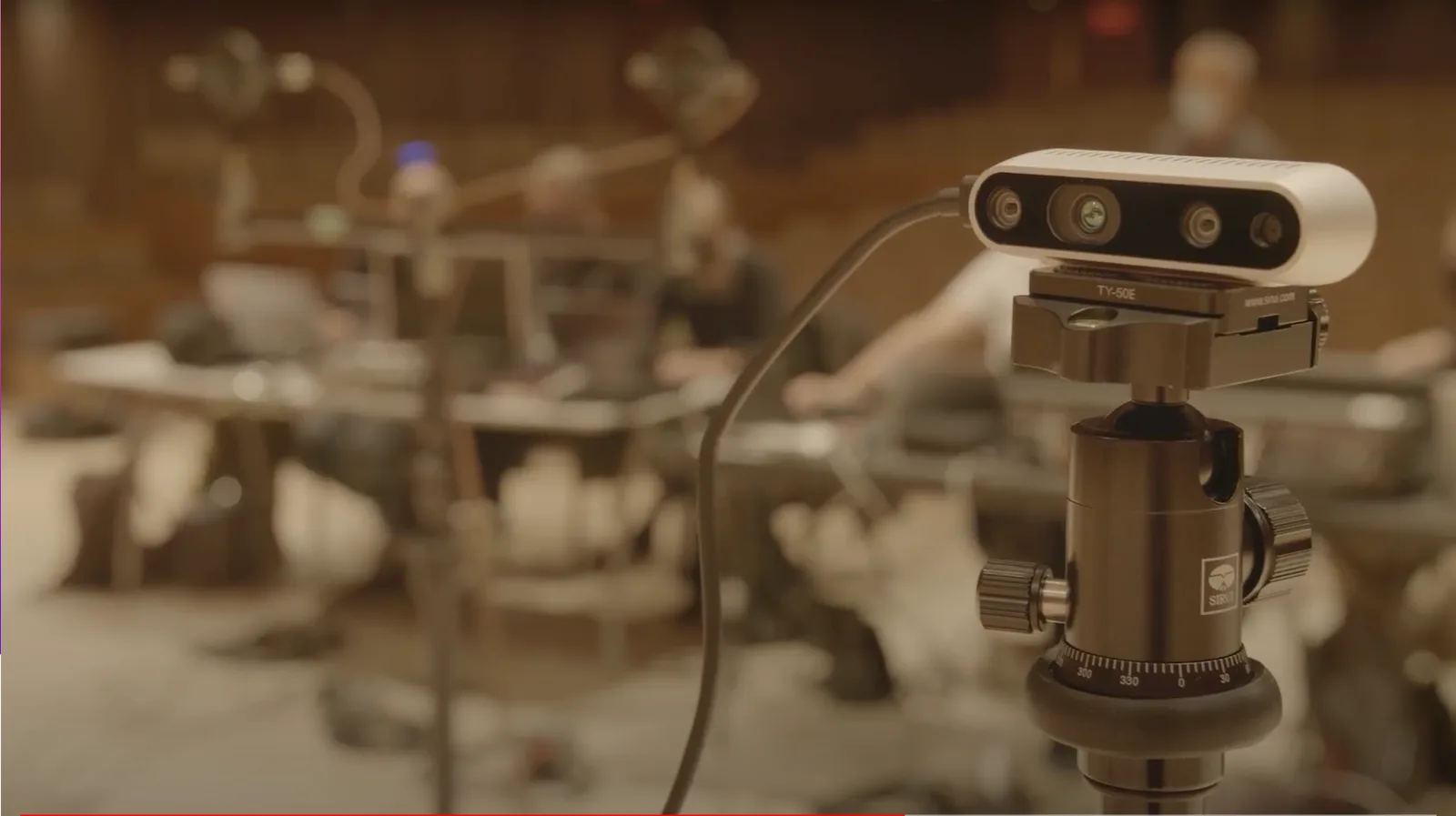
Picture of one of the Realsense depth camera that was used.
The cameras (model Intel® RealSense™ Depth Camera D435i) were strategically allocated through the orchestra in a way that would allow us to capture gestures by a majority of interpreters. In order to later be able to sync the recorded sound and the images, we made a cinema clap on the camera side.
A suite of tools
The demonstrations I had to do through the internship were to include real time capture of a human body pose, as well as the virtual rendering of this pose by an avatar in a virtual environment. To enable this, the need of a Blender add-on emerged. Here is the suite of FLOSS tools used in the making of this add-on :
-
LivePose (pose data detection and streaming) [Metalab tool]
-
Blender (animation and 3D composition)
-
a Blender add-on named Rigify (models/avatars rigging)
-
a Blender add-on named LivePose Capture (a pose data receiver) [Metalab tool]
LivePose
As part of its research, the Metalab develops LivePose, a tool about improving interactivity through the detection of participants positions as well as body and face keypoints by using video streams from cameras. It is possible to obtain the detected keypoints by using OSC Messages streamed by LivePose and accessible through filters. LivePose was useful in capturing the movements of interpreters from the OSM during their performances. By using the add-on I designed, I was able to control 3D movements in Blender through the messages that were created.
Rigify
To work on riggin and model animation, I use the Rigify add-on included with Blender. This add-on allows one to create wireframe blocks, designed for humanoids models, and to auto-generate rigs and a standard set of names for bones. Names used for bones in animation is an important question, since it allow us to automate in a simple way the mapping of LivePose keypoints to bones in animated models.
Add-on LivePose Capture
The next step is to use the Blender add-on to connect LivePose and the 3D avatars models to be animated. The name of this add-on is “LivePose Capture” or “livepose4blender” (following the other Metalab add-ons such as satie4blender and satie4unity). In order to allow for some level of compatibility and to lower restrictions for end-users, the add-on was developed for MacOS (Monterey), Windows anx Linux (PopOS!) operating systems. In theory, this add-on works on all of these systems. Since it is currently being developed, it can behave in an unstable manner and contains a few bugs in how it manages memory.
The main goal of this add-on is to simplify the use of motion capture for artists using 3D modeling software. A few user guides have been written on this topic:
The end goal of this extension is to simplify the use of motion capture, with a fast and easy deploy process, as well as to speed up the rigging process of a model (by simplifying the Rigify workflow). On top of being a libre and open source software, the add-on can be configured (by using LivePose JSON filters and the configuration interface) and allow us through Blender to export animations in a diverse range of formats (Motion Capture BVH, FBX, glTF 2.0,…). In future developments, the add-on should support multiple model animations in a simultaneous manner, while enabling a complete performance capture that includes face expressions and hands movements.
Using the LivePose add-on
I will now give an overview of how the add-on works. The tool was designed to be integrated inside a complete pipeline, illustrated below, allowing for animations exports in Unity scenes where the sound spatialization is happening in the context of the SAV+R project.
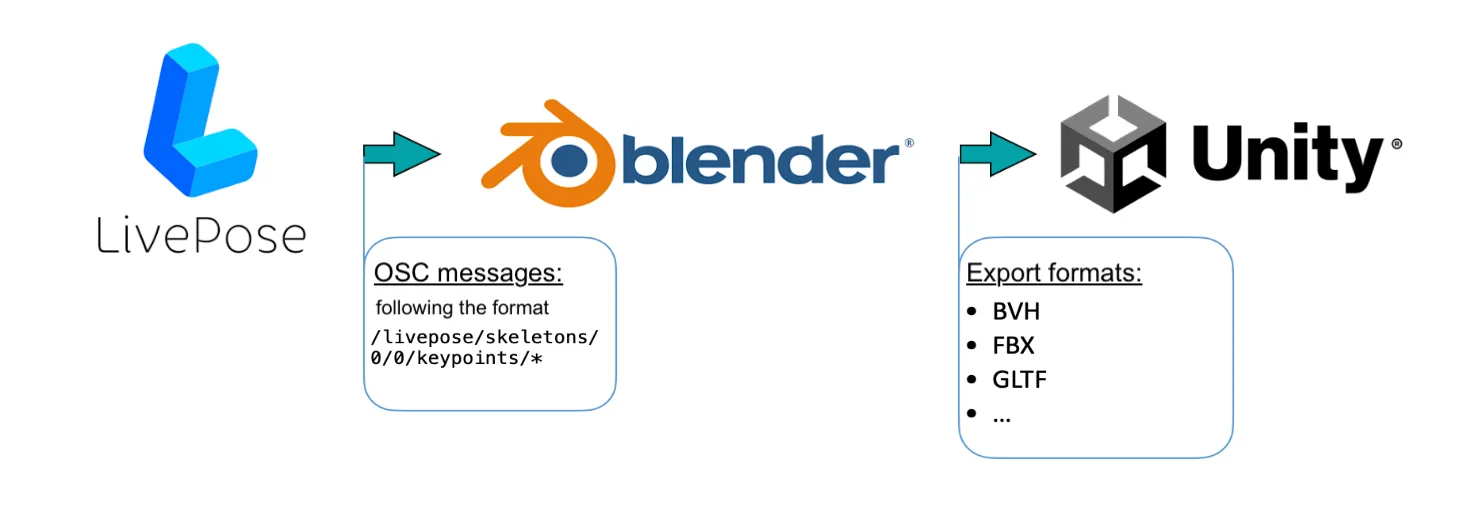
Complete pipeline.
As shown in this picture, the first step is to transfer LivePose messages to the Blender add-on LivePose Capture. In the 3D software, it is then possible to adjust the models in order to improve the motion capture animation, as well as composing scenes. The final step is to export the results in Unity, a game engine in which other creative tools are available to the user for interactivity, real time or sonification of 3D scenes.
Communication between LivePose and the add-on is done through OSC messages. Filters with the format “/livepose/skeletons/0/0/keypoints/” enables us to access coordinates for a variety of keypoints of the skeleton model, such as the nose, hands or knees. Index numbers start with “/0/0” and make it possible to go through a variety of cameras and their associated poses, if there are multiple people present.
OSC protocol
The Open Sound Control protocol is dedicated to creating networks for multimedia devices, specifically to allow their real time control. It is a flexible and precise protocol used by LivePose in order to share data such as the position of every detected bone, or estimated precision percentages.
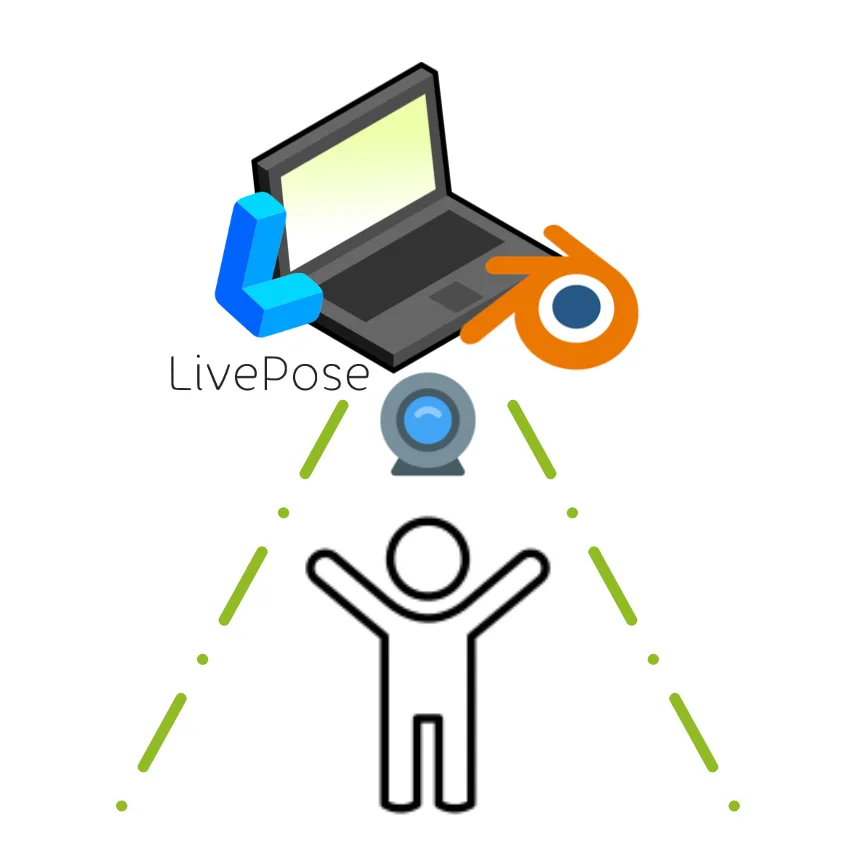
OSC protocol in local, on a single computer.
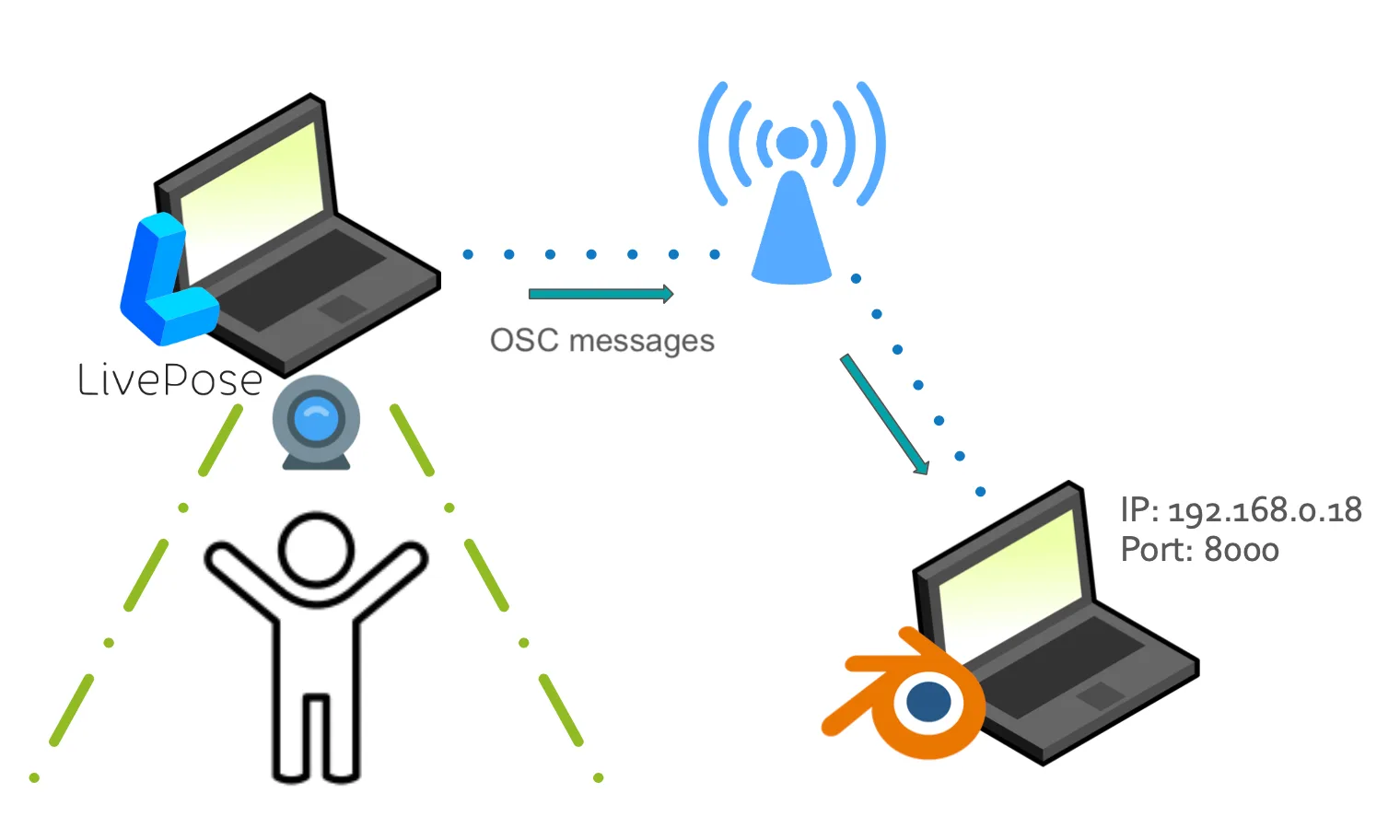
OSC protocol between two computers on the same network.
A range of capture configurations are enabled by this data transmission mode between LivePose and the Blender add-on. As shown previously, it is possible to make two different computers connect over the same network, or we can connect processes using OSC on the same machine.
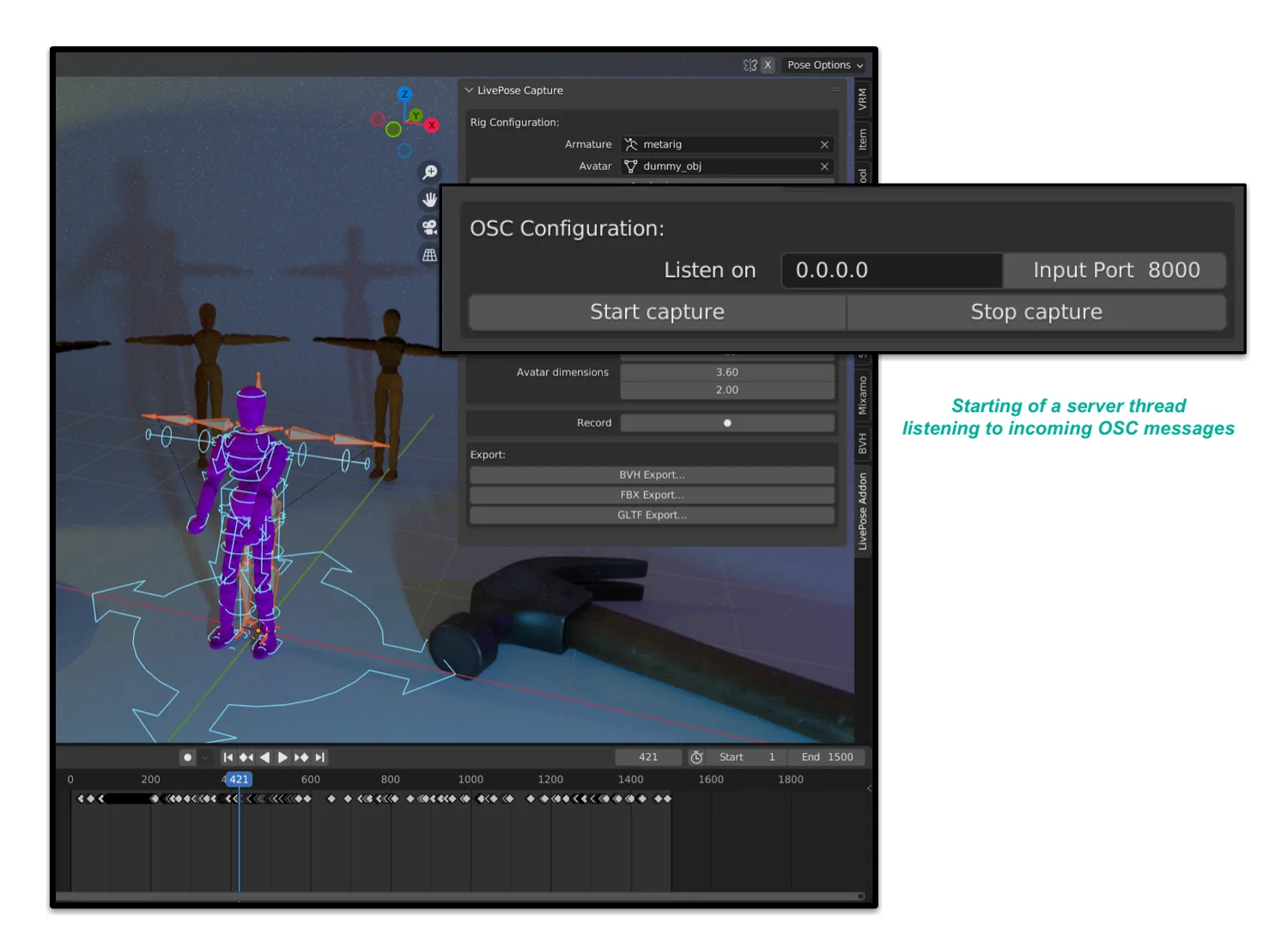
Configuring OSC messages reception in the add-on.
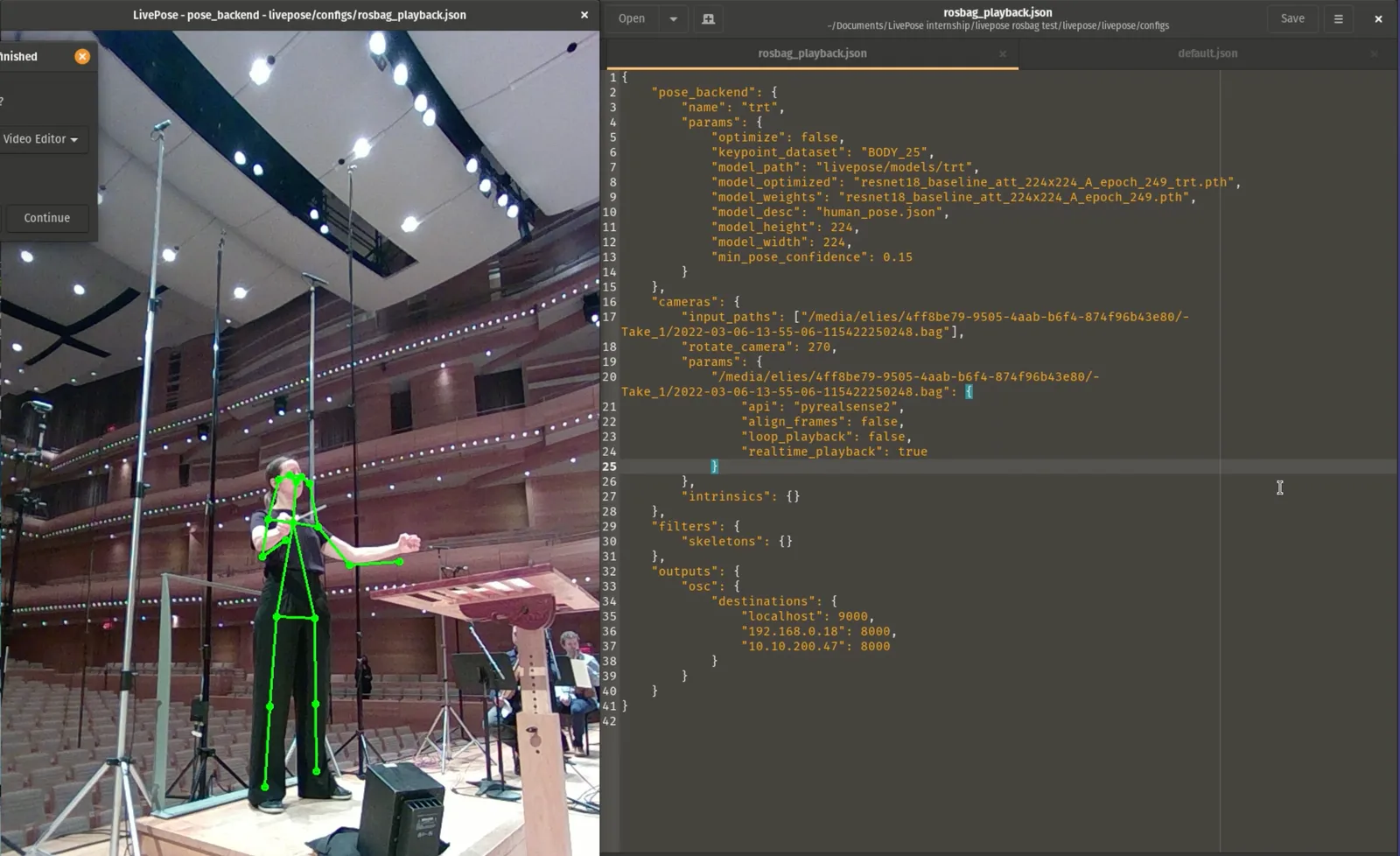
Playing a recording of the orchestra conductor by LivePose.
With the help of JSON configuration files in LivePose, we only need to specify recipients addresses to which the OSC messages will be sent. This way allows us to process the OSM recordings with LivePose before animating Blender models with the data received by LivePose Capture. The OSM performance recordings were done using the ROS bag format, that can be read and processed by LivePose.
Rigging on Blender
In order to animate the 3D models, we make use of inverse kinematics on the associated rigs. The main principle of inverse kinematics is to start for the position and orientation of a bone we want to target, and to then solve for the whole set of positions and orientations of every other bone, while respecting the hierarchy of the skeleton. This is done by using constraints information and effects called the effectors, between the bones of the pose rig, taking in account constraints for the distances between bones - if not, it would allow models to be out of shape. By solely moving the ends and the basis of skeletons to the new positions computed for the positions given by LivePose, we are able to move the complete modeled avatars.
Another technique we can use is direct kinematics. This technique creates an association between the pose of an animated skeleton by only changing the articulations parameters. For each series of inter-linked articulations, the rotations are adjusted individually, starting with the base of the body. This process can involve a lot of work, since there is an interdependence between the articulations.
The case can be made to prefer inverse kinematics since the computed movement allow us to position each articulation without having to think about the parents in the animation rigs. This prevents us from doing a certain number of operations. As an example, we can consider the case where we would like to move the ends of a limb detected by LivePose without having the base and the articulations coordinates, when these points are located outside the field of view of LivePose.
My proposal is to start with an inverse kinematics process - by moving the bones located at the ends first, before tweaking the model with code through direct kinematics. This is what is done for positioning joints from flexing angles computed on the limbs. The action detected by LivePose is then globally adjusted from the wireframe physics used, before being corrected by applying mathematical methods as implemented by LivePose Capture ( e.g. the function computed joints angles.)
By combining two kinematics modes, we should be able to obtain more realistic movements that corresponds to the limits for skeleton poses in Blender, but also to poses as detected by LivePose.
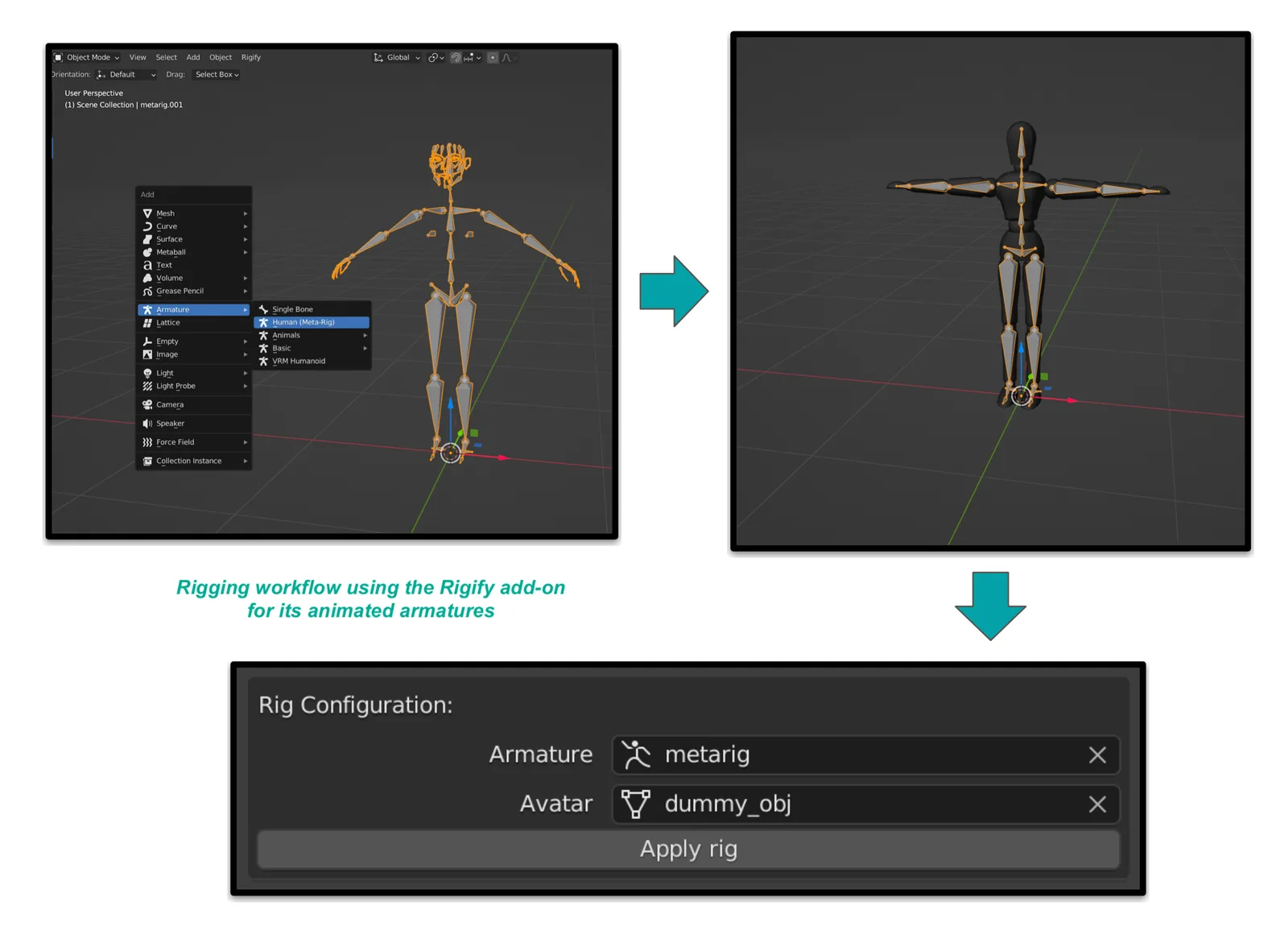
Three steps rigging workflow using the Rigify add-on.
The rigging process itself was simplify to reduce the number of actions to be done by the user. Starting with Rigify for animation wireframes, the workflow maps these to the model we wish to control. The mapping is automated. The user only needs to proceed with motion capture by starting a receiving server for OSC messages being sent from LivePose Capture.
Conclusion
We believe that this add-on is enabling motion capture to be accessible for the general public. It was developed to be easy to get started with, but also to allow for a simple and fast deploy process. We chose to keep the code well structured in order to allow it to be morphed for new use cases. Through time and users contributions, this tool can be improved and completed.
One future possible application for this add-on is camera control. In a way similar to a VR headset, it would be possible to move a visual landscape by using estimations provided by LivePose regarding eyes position and gaze direction. This would be possible by installing cameras on a rig controlled by the add-on. It goes without saying that any orientation estimation can be done instead or on top of. As an example, it is possible to control models using only the hands, like a puppet. To go even further, it would be realistic to interact with any object in a Blender 3D scene (cameras, lights, speakers, meshes, other armatures). Another technique of interest would be to explore the simulation of materials on controlled models.
Thanks to our partners
-
Financial support from the Ministère de l’Économie et de l’Innovation du Québec.
-
SAV+R : or Simulation d’acoustique volumétrique en réalité virtuelle (RV), mixte (RM) ou augmentée (RA). Research project in sound navigation led by the Metalab in collaboration with OSM. With the goal of developing the value of technological innovations coming from research linked with artistic projects, SAV+R builds a bridge between research and cultural institutions as well as entrepreneurs.
-
OSM : Orchestre symphonique de Montréal, with whom the SAV+R partnership is evolving and whom was recorded at the Maison symphonique de Montréal, located at Place des Arts. Note that this is the only orchestra in possession of an octobass, worldwide.
-
OSM Polyphonique : Virtual, immersive sound application in augmented reality for navigating among the OSM. By using the WalkthrumusicTM technology developed by Zack Settel (musician) and Expériences Musique6D, the OSM wish to bring music to life in a different way, outside specialized venues by using new technologies. Animations and visual design of the application are made by the interactive studio Dpt.
-
SAT : Society for Arts and Technology, with buildings in Montréal (QC, Canada).
-
Metalab : Research and development lab of the SAT.
References and links
LivePose : Pose detection and movement tracking FLOSS developed by Metalab and used to process OSM performances recordings.
Blender : CGI FLOSS for animation in 2D and 3D that was used to render the movements sent through OSC messages by LivePose to allow the animation of avatars.
Add-on Rigify : Tool for automated rigging done from wireframes and bones.
Add-on LivePose Capture : A Blender add-on that was developed to process LivePose data in Blender, in order to realize a movement capture from videos of OSM performances.
OSC protocol : Data transmission format used for real time control between LivePose and the Blender add-on.
Published on 09/12/2022 by Eliès Jurquet (ejurquet(at)sat.qc.ca)
Footnotes
-
Motion capture examples - Sam Rolfes - Bunny’s Dream (Marionnettes en VR) - Inition London - Westfield’s Future Fashion event ↩