Note: This blog post contains the details of the work I did during my GSoC period. For a tldr, please check out the work product!
Introduction
As part of my contribution to Google Summer of Code (GSoC) 2023, I was to clean up Splash’s use of graphics code, as well as make it work on the Raspberry Pi (Rpi). After a brief period of slow work due to my finals, work began on reviewing existing graphics rendering libraries. One of my mentors, Jean-Michael Celerier, provided a list of possible libraries to check out. Some were unmaintained, some were maintained but for personal use, etc.
Sidequest 1: Testing
It was apparent that we’d need some automated way to be able to quickly iterate and test code, so I went on a little sidequest to get to know Splash more in depth while reviewing graphics libraries. The existing testing infrastructure didn’t support testing if the output was correct. Splash did have a sink, which was a way to capture the output of Splash in case you needed it somewhere else. Using this, I set up a basic test case that used reference images and compared them to Splash’s output.
Quest 1: Exploring libraries and pi graphics API support
Continuing on with library exploration, the list whittled down to bgfx, Granite, Magnum. All of them are very capable in their own right, but each carried downsides as well.
At this point, I was feeling a bit sidetracked. So I took some time to refocus by seeing which APIs our “target” (Raspberry Pi 4) supported. At the time of writing, the Pi supports Vulkan 1.2, and OpenGL ES 3.1 along with some parts of 3.2. It seemed like supporting OpenGL ES might be a good first step to making Splash run on the Pi, so I homed in on that. Vulkan was a compelling choice, but it was too verbose and different from existing code. And while Vulkan provides speedups for CPU-bound applications, Splash is mostly GPU bound at the moment.
Quest 2: Transformation
The next few weeks were spent in a haze of segfaults, crashes, error callbacks, and countless hours of renderdoc debugging. “Why isn’t anything rendering?” was a frequent question on my mind, but I persisted. I started off by fixing the segfaults. These were due to loading an OpenGL ES context, but using OpenGL 4.x calls, which weren’t loaded, leaving their function pointers as null. This was a matter of repeatedly launching Splash in gdb, waiting for it to blow up, then figuring out which OpenGL ES call corresponded to the call that crashed. Some parts of the API needed a bit more work than finding the corresponding OpenGL ES call, like memory mapping, but the docs were always there to guide me.
After that, the errors. GLSL for OpenGL ES (GLSLES from now on) requires that you specify floating point precision for either each variable, or for the whole shader (as I understand it right now). It also doesn’t support some implicit conversions that normal GLSL allows. The biggest hurdle here was from Splash’s shader construction wizardry. Where a bunch of “modules/imports” where built into the program, each associated with some name. The shader code would then search for include <module> and replace it by the corresponding module’s code. Basically replacing the preprocessor. This caused the code handed to the driver to be a bit different from the code I was editing and confusion ensued. But this was fixed with some good old debugging aided by gdb’s printf’s to print the assembled shader code!
Next was uniform initialization. This is used to provide default values for uniforms in the shader source code so you don’t have to keep track of it on the CPU. GLSLES does not support uniform initialization. This caused a few shader compilation errors, as well as a couple bugs related to rendering and gamma correction. By this point, though, I had some momentum going. So I gritted my teeth, analyzed error logs, and debugged my way through it.
And there was light! I finally got something to display using OpenGL ES. Despite not being on the Rpi, this was a great first step. It would be a headache to try and fix things on the Rpi without knowing whether the existing code worked or not.
 First “proper” render out of the OpenGL ES code, notice the dark void in the background. This is supposed to be the GUI.
 Turns out, the GUI was rendering, although very sneakily.
Quest 3: More testing
Next up was testing. My other mentor and the main maintainer of Splash, Emmanuel Durand, provided a list of basic tests so we can figure out if all basic functionality works properly. The three most related to graphics were loading images, loading videos, and blending. Loading images already worked. Emmanuel provided me with a couple of videos in multiple resolutions and formats to make sure the main codepaths were covered.
And of course, Splash segfaulted on the first video I tried. This as usual was solved with a bit of debugging and documentation scouring. Then came blending, note that since the beginning, I tested and fixed stuff locally, then re-tested and further fixed stuff on the Pi. This was a bit of a footgun when it came to blending, as blending requires some features of OpenGL ES 3.2 that the Pi doesn’t quite support yet, so I was quite disappointed when blending worked locally, but refused to work on the Pi citing GL_INVALID_ENUM when creating a tesselation shader. This wasn’t really a big issue though, since blending is usually used when you have more than one output. The poor Pi couldn’t even handle one output well at the moment.
Sidequest 2: Profiling
Another sidequest that I went on was profiling the pi using Tracy. Tracy was honestly magical when it worked. It was a bit of a pain to run on the pi as it doesn’t explicitly support OpenGL ES, but using an older version (v0.7.6) and following the solution here worked well.
Turns out, the pi spends most of its time swapping buffers, which most likely involves waiting for the GPU to finish, so we were quite sure the pi was GPU bottlenecked at this point. There was no other way to figure out exactly what was causing this issue, so we focused on making sure the OpenGL ES code wasn’t too slow versus the old OpenGL code. I spent a bit of time profiling on my laptop, but I’ll spare you the boring details for in issue (#85). Tl;dr: The new code path doesn’t significantly affect performance.
Quest 4: Reconciliation
The next step was blending up the new and existing code so that Splash can still be released as one binary instead of an OpenGL version and an OpenGL ES version. This mainly involves choosing an API, initializing it properly since OpenGL and OpenGL ES required slightly different initializations, then redirecting calls so the appropriate code was called for the chosen API.
I looked at a couple of things for inspiration, with the main thing being QT’s RHI API. The main idea with this kind of thing is that we want to redirect calls at runtime from some unified interface. This of course screams OOP/Inheritance (or function pointers for C programmers), so I started by drafting out a Renderer class, specializing that for OpenGL and OpenGL ES, moved on to textures which were the biggest plate of spaghetti I’ve seen for some time (sorry, Manu), but that couldn’t stop me at this point. Gpu buffers were next, and things kinda snowballed from there. After some time, I had Splash running under OpenGL 4.5 (anywhere that supports it) and OpenGL ES (for the pi specifically), with automatic API detection between the two.
The final hierarchy for the renderers is summed up by the following diagram:
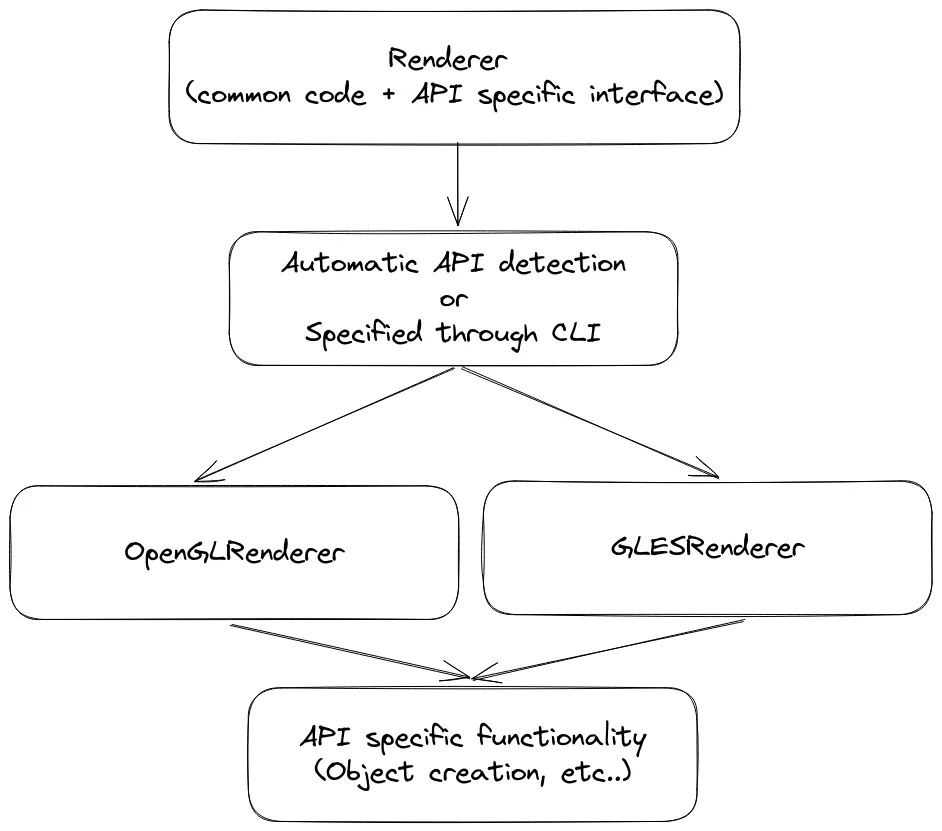
Renderer class hierarchy
Each class that touched graphics code got separated into a class that has application code, some methods for shared OpenGL/OpenGL ES graphics code, as well as pure virtual methods for parts that were API specific. An extra class would then inherit from this class and implement graphics API specific methods. The following diagram shows a general example, where Foo can be replaced by Texture_Image for example:
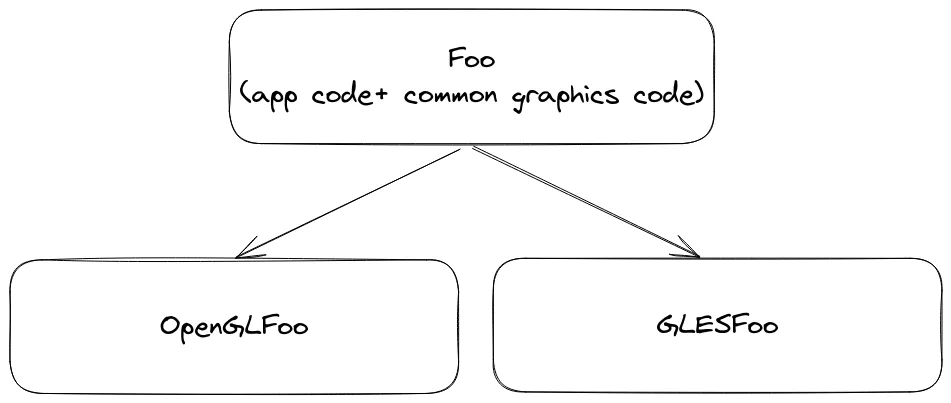
Mixed Foo class hierarchy
This was good enough to make splash work with both OpenGL and OpenGL ES, but what about other graphics APIs? Another suboptimal thing was the mixture of application and graphics code. These were the next things to tackle.
Quest 5: Separation
I spent my last couple of weeks working on MR #628, which aimed to separate application code and graphics API specific code such that adding support for a new API would theortically just require maintainers to implement some interface and not have to fiddle with application code. This adds the benefit that changes to graphics code would have less effect on application logic. This keeps the renderer hierarchy from the previous section, but adds another layer between application logic and graphics code to allow for better maintainability. The following diagram illustrates this:
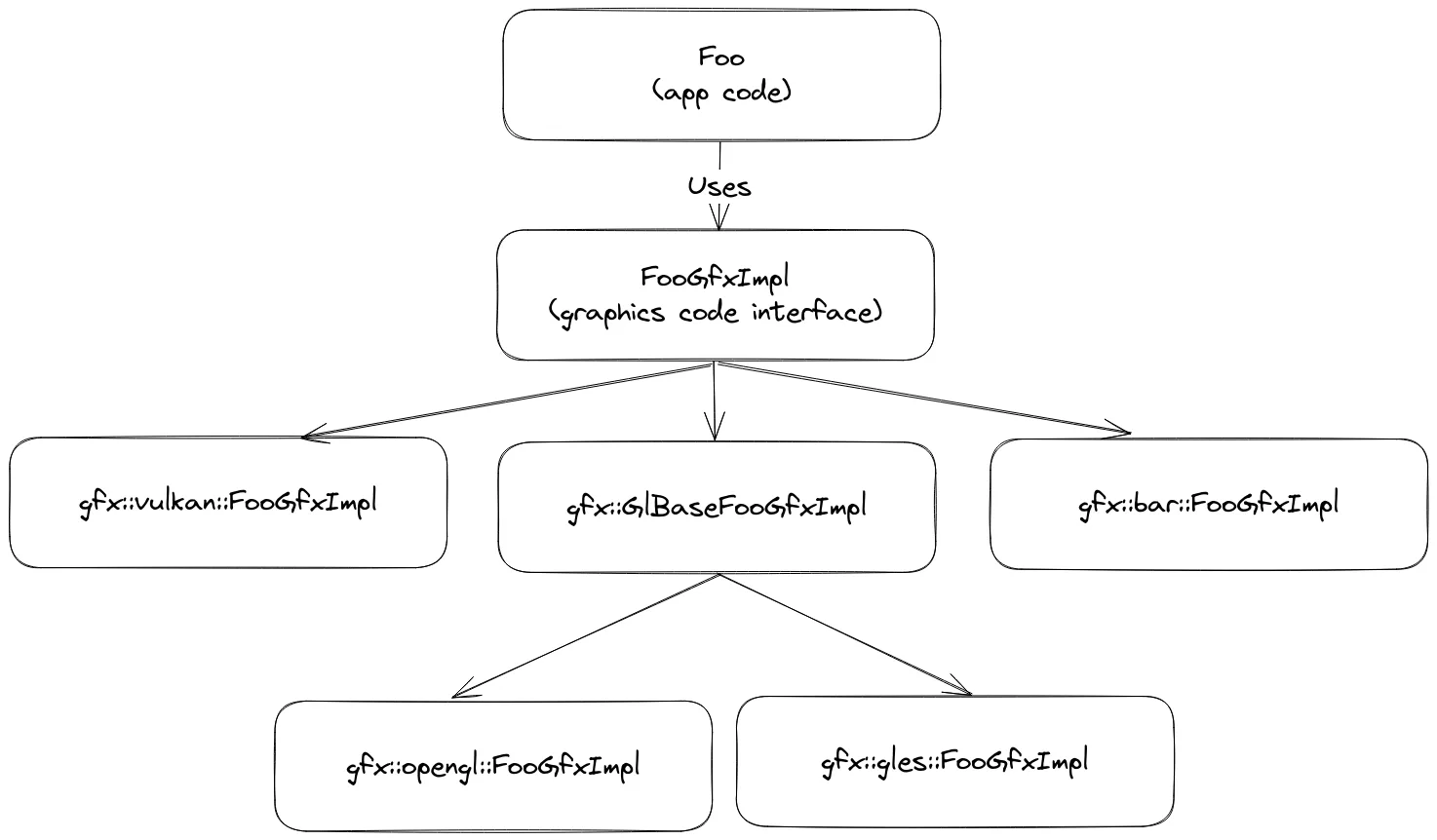
Separated Foo class hierarchy
Now, instead of each renderer creating instances of Foo for its API, it would instead create gfx::<API>::FooGfxImpl, passing those to Foo objects to manage for duration of the program as unique_ptrs. You can also notice that methods shared between OpenGL and OpenGL ES were moved to gfx::GlBaseFooGfxImpl to remove all remaining API specific code present in Foo, while allowing OpenGL / OpenGL ES classes to only override the methods that are needed. If for example your graphics code works for both OpenGL and OpenGL ES, you can forego this base class.
Conclusion and final words
One important thing that I wish to emphasize to other developers: It’s essential to deploy on your target device as soon as possible. One of the biggest surprises that I encountered repeatedly is that if the code runs on my laptop with OpenGL ES, it’s not guaranteed to run on this version of the Rpi. This is due to a couple of factors: The drivers on my laptop support some OpenGL calls even when running under an OpenGL ES context; another thing is that the pi doesn’t 100% support OpenGL ES 3.2, while my laptop supports it. This has led to multiple instances of me being sure the code works well, testing it on the Rpi, only to find it crashing on some OpenGL call or reporting an error.
Overall, my time at GSoC 2023 was quite enjoyable and elevated my skills as a programmer working with C++, OpenGL, and graphics code in general. It also taught me a few precious skills regarding code separation and documentation. As well as teaching me how to collaborate with and report to others remotely in an efficient and concise manner. It was a blast and I sincerely thank my mentors for their invaluable aid during this time!